
Vibrations!
Uses: monitoring vehicle engine vibration, monitoring vibrations of household appliances (dishwasher, refrigerator, waste disposal units, clothes dryers, etc.), measuring g-force in moving vehicles, helping to identify failing gears, evidenced by knocking sounds, modes, etc..
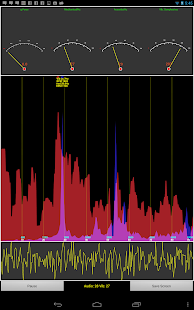
Vibrations uses data streams from the built-in accelerometer and microphone: it calculates two simultaneous FFTs, one from the mechanical measurements, one from the audible measurements.
It then shows the frequency spectra on the screen.
The frequency axis is labelled in Hz and RPM (revolutions per minute).
Four on-screen software gauges give an overview of the measurements:
1) The g-force (excluding gravity), which measures acceleration2) The frequency of the current peak in the mechanical/vibration noise3) The frequency of the current peak in the acoustic noise4) The sample rate at which mechanical vibrations are being measured
Screen shots can be taken using the "Save Screen" button, and stored to the SD card.
Time series of accelerometer data (up to 20 seconds) can be recorded and saved using the "Record Data" button.
Since data are continually being gathered, the recorded data written to the file actually starts a second or so *before* the button was pressed.
Recording can be interrupted while in progress, and the data discarded or saved.
Otherwise, the recording will automatically terminate after 20 seconds have elapsed, and the data discarded or saved then.
Data collection can be paused and resumed using the "Pause"/"Resume" button.
This is the first release of this app, and ideas for improvements/enhancements are welcome: please contact me.
Also, please note that the frequency limit of the mechanical vibration measurement is limited by the maximum rate that accelerometer samples can be obtained from the Android device: this typically varies from device to device - e.g.
on the Nexus 7 and 10 tablets, the rate is ~200 samples/sec, giving a maximum frequency measurement of ~100Hz or 6000 RPM.
On the Galaxy S3 the rate is ~100 samples/sec, giving a maximum frequency of ~50Hz.
About Vibrations!
- Package name (App ID)
- com.julian.apps.Vibrations
- Available on
- Google Play
- Price
- Free
- Version
- v2.4
Looking for the Vibrations! APK?
The safest way to get Vibrations! (com.julian.apps.Vibrations) on your Android device is to install it directly from Google Play — you'll always get the latest official version, automatic updates, and no risk of modified or infected APK files from third-party sites.
Music Features
Enjoy high-quality music streaming and playback features.
Shopping Features
Shop online and find the best deals.
Smart Home
Control and monitor your home with smart features.
See Vibrations! in Action


Frequently Asked Questions
Is Vibrations! free?
Yes, Vibrations! is free to download and install on Android through Google Play.
How do I install Vibrations! on Android?
Open Google Play on your Android phone or tablet, search for Vibrations! or tap the Google Play button on this page, then tap Install. The app downloads and installs automatically.
What is com.julian.apps.Vibrations?
com.julian.apps.Vibrations is the App ID (package name) of Vibrations! on Google Play. Every Android app has a unique package name, and it is the safest way to verify you are installing the official app.
Is Vibrations! safe to download?
Installing Vibrations! from Google Play is the safest option: you get the official version, verified by Google Play Protect, with automatic updates. Avoid APK files from unofficial third-party sites.
Get Vibrations! Today
Vibrations! for Android — free download on Google Play.
Compatible with Android phones and tablets — available on Google Play.
Ask AI about this app
Get instant answers about features, tips and more from popular AI assistants.